All blog articles
When AI Agents work directly with Microsoft Dynamics 365

When AI Agents work directly with Microsoft Dynamics 365

ERP integration is where automation becomes real. This article explains how Dynamics 365 supports modern API-based integration, what it enables (auth, CRUD, actions, events), and how Nordoon Agents connect to Dynamics 365 so they can pick up orders as they arrive and keep ERP data aligned.

Timotej Gale
January 19, 2026
TIME TO READ:
MINUTES
Why ERP integration decides whether automation delivers


Organizations invest in intelligent automation to replace manual, time-consuming work with faster, more reliable execution, so people can focus on higher-value tasks. Automated document processing, data extraction, validation, and decision support are capabilities that deliver significant value. However, their full potential remains unrealized until the processed data flows seamlessly into the systems where business actually operates.


For most organizations, that system is their Enterprise Resource Planning (ERP) platform. The ERP functions as the operational backbone where financial transactions are recorded, orders are managed, inventory is tracked, and planning decisions are executed. When automation platforms can reliably read from and write to the ERP, the entire investment pays off. When they can’t, integration becomes the bottleneck. When that integration is fragile, slow, or maintenance-intensive, it becomes the constraint that limits what automation can achieve.


This matters beyond operational efficiency. Real-time integration with ERP enables automation that responds to current business state: checking inventory before confirming orders, validating customer credit status, or incorporating latest pricing into processed documents. It enables closed-loop processes: processed data creates transactions, and transaction outcomes feed back into the next step. And it provides the audit trail and data consistency that finance and compliance teams require.


ERP integration is not merely a technical requirement to be solved once and forgotten. It is a strategic capability that determines how deeply automation can transform business operations.


Automation succeeds or fails at the ERP layer


Connecting external systems to enterpriseERP platforms presents genuine challenges that persist regardless of the technical approach chosen.


ERP systems are business-critical infrastructure. They enforce complex validation rules, maintain referential integrity across related records, and implement business logic that has been refined over years of operation. External systems cannot simply push data into an ERP. They must respect its rules, match its expectations, and handle its responses appropriately. A sales order requires a valid customer. A purchase order confirmation must reference an existing order. A demand forecast must align with defined planning hierarchies. These constraints exist for good reasons. They also make integration hard.


Security and access control add further layers. ERP systems protect sensitive financial and operational data. Granting external access requires careful consideration of authentication methods, permission scopes, and audit requirements. Organizations must balance the need for automation access against the risks of overly broad permissions or inadequately secured credentials.


The diversity of ERP deployments compounds these challenges. Organizations run different products, different versions, different configurations, and different customizations. Forms have been modified, fields added, workflows adjusted to match specific business processes. An integration approach that works in one environment may require adaptation for another.


Legacy integration struggles under change and volume


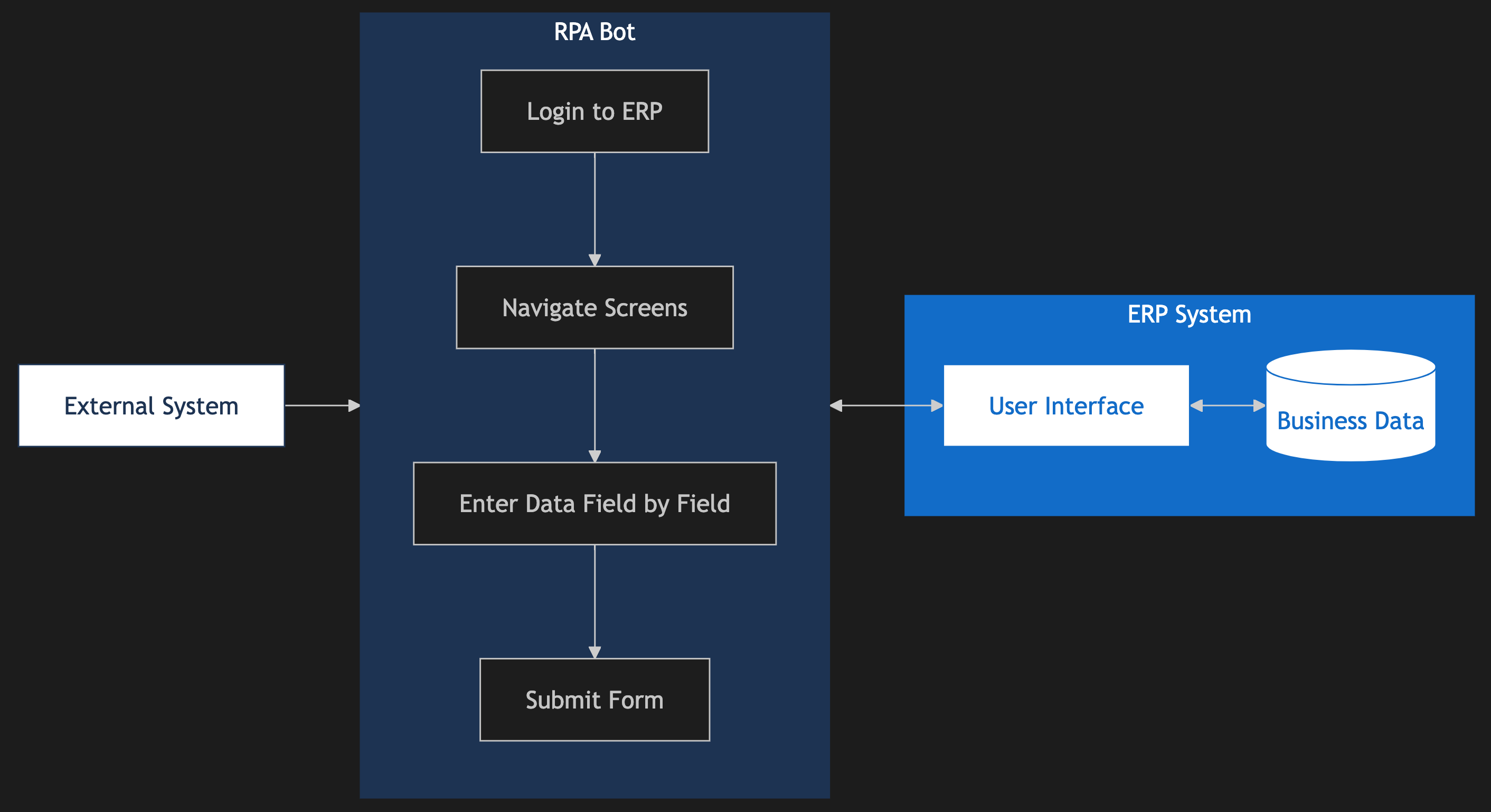
Faced with these inherent challenges, many automation initiatives have relied on Robotic Process Automation as an integration bridge. RPA bots log into the ERP interface, navigate screens, and enter data field by field, mimicking the actions a human user would take.

Figure 1: RPA-based integration: Bots mimic human interactions through theUI, creating brittleness and performance constraints.


This approach introduces additional problems layered on top of the inherent complexity.


ERP vendors release updates regularly, continuously improving their platforms with new features and interface refinements. For UI-based automation, every update risks breaking processes that previously ran fine. A button moves, a field is renamed, a validation message changes format. RPA scripts that depend on specific UI elements fail when those elements change, requiring ongoing maintenance and regression testing cycles.


Performance limitations constrain whatRPA-based integration can accomplish. Because RPA simulates human interaction, it almost runs at human speed. Creating a sales order through the interface takes approximately thirty seconds whether performed by a person or a bot. For high-volume scenarios (i.e. processing hundreds of purchase order confirmations or thousands of extracted invoices), this performance ceiling becomes a genuine constraint, requiring parallel bot infrastructure and complex orchestration.


Adapting RPA solutions as business needs evolve proves difficult. Custom fields, modified forms, and changing workflows mean RPA scripts require ongoing customization as the ERP environment changes. Organizations must also invest in RPA infrastructure—bot licenses, execution servers, and orchestration platforms—adding cost and complexity to what should be straightforward data exchange.


The result is an integration approach that works but imposes ongoing costs in maintenance effort, performance limitations, and scaling friction—costs that accumulate over the lifetime of the automation program.


Microsoft Dynamics 365 was built for integration


Unlike traditional on-premise ERP systems,Microsoft Dynamics 365 is cloud-native and designed for integration from the start. The platform exposes comprehensive REST APIs built on OData v4standards, enabling direct programmatic access to business data and processes.

The Dynamics 365 Product Family

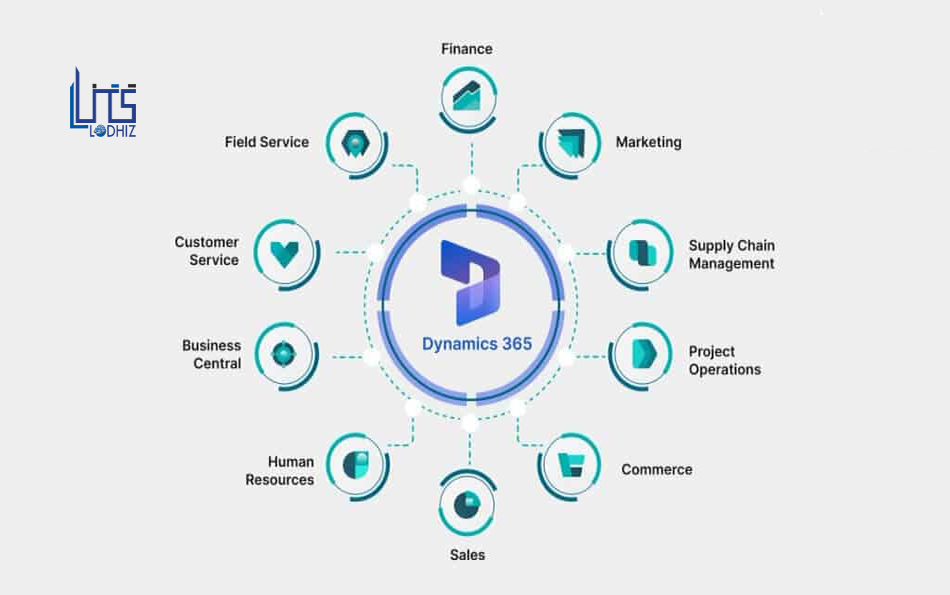
Figure 1: Dynamics 365 landscape. (Reference image source: [LITSServices](https://www.lits.services/european-businesses-adopt-microsoft-dynamics-365/)- need to replace with original artwork)


Microsoft's Dynamics 365 portfolio is extensive and continuously expanding. The ecosystem includes:

  • ERP apps: Business Central, Finance, Supply Chain Management, Commerce,Human Resources, Project Operations
  • CRM and customer engagement: Sales, Customer Service, Contact Center, Field Service, CustomerInsights
  • Specialized solutions: Mixed Reality apps (Guides, Remote Assist), Sustainability Manager
  • Industry clouds: Healthcare, Retail, Financial Services, and other vertical solutions
  • Power Platform: Power Automate, Power Apps, Power BI for workflow automation and analytics


All these applications share common integration foundations—OAuth 2.0 authentication via Microsoft Entra ID, RESTAPIs, and the broader Microsoft cloud ecosystem. For supply chain automation, the most relevant are the ERP applications where orders, inventory, and financial transactions live—primarily Business Central for small and mid-sized businesses, and Finance and Supply Chain Management for enterprises.


Dynamics 365 Business Central
targets small and medium businesses, offering a REST API v2.0 with comprehensive access to business entities through well-documented endpoints.Business Central operates primarily as a SaaS solution, with API access built into every deployment.


Dynamics 365 Finance and Supply ChainManagement
(often referred to as "Finance andOperations apps") serve enterprise organizations, offering multiple integration patterns: OData endpoints for real-time operations, custom X++services for specialized business logic, and batch APIs for high-volume data exchange.


How authentication works in Dynamics 365 APIs


API access to Dynamics 365 cloud deployments requires OAuth 2.0 authentication via Microsoft Entra ID (formerlyAzure Active Directory). This standardized approach enables secure, token-based access using service principals—application identities designed specifically for automated, unattended operations.


Integration requires three credentials:

  • Tenant ID: Identifies the client's Microsoft cloud environment
  • Client ID: Identifies the registered application
  • Client Secret: Serves as the application's secure credential


Service principals can be granted specific permission sets aligned with integration requirements, following the principle of least privilege.


For on-premise deployments, API authentication options vary. Business Central on-premise supports both OAuth2.0 via Microsoft Entra ID and basic authentication using Web Service AccessKeys. Finance and Supply Chain Management on-premise uses OAuth 2.0 throughActive Directory Federation Services (AD FS).


What you can do through Dynamics 365 APIs


The Dynamics 365 APIs support full CRUD(Create, Read, Update, Delete) operations on business entities. Records can be created, updated, queried, and deleted through standard REST calls. Features like "deep insert" allow creating parent and child records (such asan order with its line items) in a single request.


Common integration scenarios include:

  • Creating and updating sales orders, purchase orders, and invoices
  • Querying inventory levels, order statuses, and customer data
  • Updating confirmation dates, quantities, and delivery information
  • Synchronizing master data such as customers, vendors, and products


A simple example, creating a sales order in Business Central:

POST /api/v2.0/companies({companyId})/salesOrders
Authorization: Bearer {token}
Content-Type: application/json

{
  "customerNumber": "C00010",
  "orderDate": "2026-01-15",
  "salesOrderLines": [
    {
      "itemId": "ITEM001",
      "quantity": 10
    }
  ]
}


The APIs enforce Dynamics 365's built-invalidation rules. Invalid requests, like referencing a non-existent customer or missing required fields, return detailed error responses identifying the specific issue. Beyond CRUD operations, bound actions allow triggering business procedures through the API, such as posting an invoice or releasing a sales order.


Dynamics 365 Finance and Supply Chain Management offers additional integration patterns including business events (notifications to external systems via Power Platform or Azure when processes complete) and batch APIs for high-volume data exchange.


Cloud vs. on-prem: what changes for integration


API capabilities vary by deployment model.Cloud deployments—the default for Business Central and increasingly common for Finance and Supply Chain Management—provide full API access with standardized OAuth authentication through Microsoft Entra ID.


On-premise deployments support similar API capabilities but require additional authentication configuration. Microsoft's platform direction strongly favors cloud deployment, with new features and capabilities prioritized for cloud environments.


Nordoon’s approach to ERP integration


Dynamics 365 excels at managing structured business data—customers, orders, inventory, financials. But supply chain operations involve more than ERP transactions: unstructured documents, complex exception handling, multi-system coordination, and decisions that require context from multiple sources. Nordoon addresses these challenges at the workflow level.


What Nordoon adds on top of Dynamics 365


Intelligent document processing


Supply chain documents arrive in countless formats: emailed purchase orders, PDF invoices, scanned confirmations, shipping notices. Nordoon extracts structured data from these unstructured sources with over 99% accuracy, transforming them into validated records ready for downstream systems.


Workflow orchestration


Beyond extraction, Nordoon coordinates end-to-end workflows. When a supplier confirmation arrives, Nordoon doesn't just extract the data, it validates against existing orders, routes exceptions for review, manages approval workflows, and coordinates updates across systems. Human oversight is maintained through configurable validation loops.


Data standardization and enrichment


Nordoon standardizes incoming data against your specifications: normalizing formats, enriching records with contextual information, and ensuring consistency before data reaches your ERP.


Exception handling


Not every document fits the happy path. Nordoon manages exceptions intelligently: flagging issues, routing for human review when needed, and learning from resolutions to improve future processing.


How Nordoon and Dynamics 365 work together


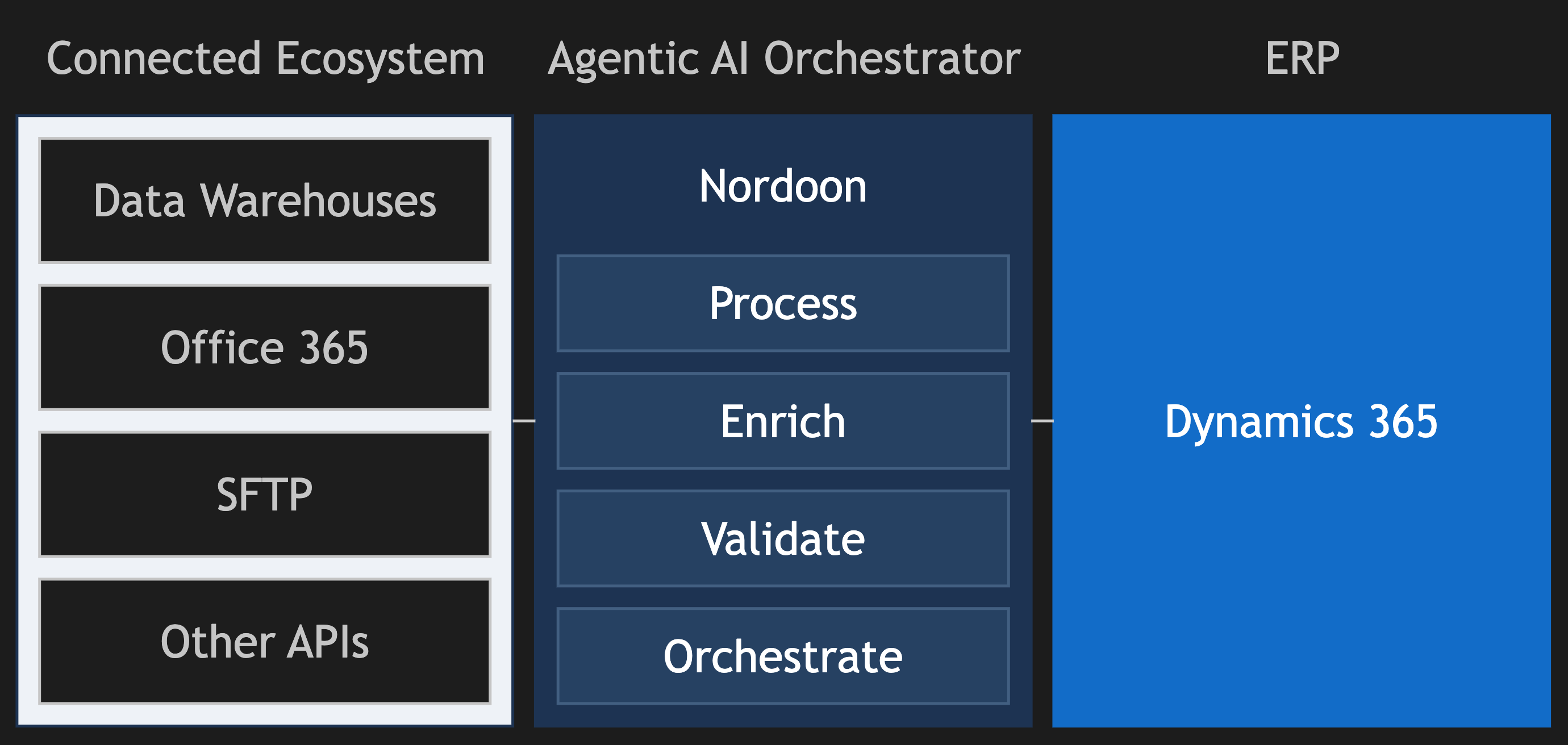
Nordoon connects with Dynamics 365 as part of end-to-end workflow orchestration—creating a bidirectional flow where ERP context informs agents and validated outputs feed back into business transactions.

Figure 1: Nordoon as central orchestrator: Connecting your and external ecosystems and coordinating with Dynamics 365.


From Dynamics 365 to Nordoon
: Nordoon agents query Dynamics 365 to enrich and validate processed data in real time. For instance, when processing an incoming order, Nordoon can verify the customer exists, check credit limits, confirm product availability, and retrieve pricing—ensuring extracted data aligns with ERP reality before any transaction is created.


From Nordoon to Dynamics 365
: Once data is processed and validated, Nordoon triggers downstream updates through direct API calls, integration middleware like Azure Logic Apps and Power Automate, or existing automation infrastructure including RPA platforms. The integration approach adapts to your environment—modern cloud deployments can leverage OAuth-authenticated API calls; organizations with existing automation investments can incorporate Nordoon into established workflows.


This orchestration capability extends across your technology stack. Nordoon connects to Office 365 via a native Microsoft Graph API connector, data warehouses(e.g., Snowflake), and other enterprise systems through configurable API andSFTP connectors—enabling agents to pull context from any source and orchestrate actions across systems.


Dynamics 365 manages your business transactions. Nordoon orchestrates the complex workflows that feed them. This is how we supply chain automation connects smoothly with Dynamics 365.


References

Microsoft official documentation

1. Microsoft Learn. "What is Dynamics365?"

 https://learn.microsoft.com/en-us/dynamics365/get-started/intro-crossapp-index

2. Microsoft Learn. "Dynamics 365 RESTAPIs Overview."

 https://learn.microsoft.com/en-us/rest/dynamics365/

3. Microsoft Learn. "Integration between Finance and Operations Apps and Third-Party Services."

 https://learn.microsoft.com/en-us/dynamics365/fin-ops-core/dev-itpro/data-entities/integration-overview

4. Microsoft Learn. "Open DataProtocol (OData) - Finance and Operations."

 https://learn.microsoft.com/en-us/dynamics365/fin-ops-core/dev-itpro/data-entities/odata

5. Microsoft Learn. "Create SalesOrders - Business Central API v2.0."

 https://learn.microsoft.com/en-us/dynamics365/business-central/dev-itpro/api-reference/v2.0/api/dynamics_salesorder_create

6. Microsoft Learn. "API Endpoints forDynamics 365 Business Central."

 https://learn.microsoft.com/en-us/dynamics365/business-central/dev-itpro/api-reference/v2.0/endpoints-apis-for-dynamics

7. Microsoft Learn. "Authentication and Credential Types - Business Central."

 https://learn.microsoft.com/en-us/dynamics365/business-central/dev-itpro/administration/users-credential-types

8. Microsoft Learn. "Authentication inDynamics 365 Finance + Operations (on-premises)."

 https://learn.microsoft.com/en-us/dynamics365/fin-ops-core/dev-itpro/deployment/authentication-onprem

9. Microsoft Learn. "Business EventsOverview - Finance and Operations."

 https://learn.microsoft.com/en-us/dynamics365/fin-ops-core/dev-itpro/business-events/home-page

10. Microsoft Learn. "TechTalk:Integration Patterns for Finance and Operations Apps."

  https://learn.microsoft.com/en-us/dynamics365/guidance/techtalks/integrate-finance-operations-overview

Technical resources

11. Kauffmann @ Dynamics 365 BusinessCentral. "Deep Insert with Business Central APIs."

  https://www.kauffmann.nl/2020/05/05/deep-insert-with-business-central-apis/

12. Dynamics 365 Community. "Dynamics365 F&O Integration using OData/REST API."

  https://community.dynamics.com/blogs/post/?postid=a2f8212a-84cc-4b0c-82d3-9fe207767a6d

Get a free consultation on your use case
30 minutes. No prep required. We’ll walk through your workflows.
ABOUT THE AUTHOR
Timotej Gale

Enjoyed this read?

Subscribe to our newsletter, and we will send AI automation insights like this straight to your inbox on a regular basis.